


Home>Online tools & equipment>Partner offers
Partner offers
Free Download of the Office Suite
With an active email account (student or faculty/staff) at prenom.nom@sciencespo.fr, you can access a free installation of the latest Office Suite offered by Microsoft for your personal use, including Word, Excel, PowerPoint, OneNote, Access, Publisher, Skype for Business, and more.
- Can be downloaded on up to 5 different devices (PC/Mac/Tablets).
- License valid for one year from the date of download, renewable annually as long as your prénom.nom@sciencespo.fr account is active. This offer is only valid for current Sciences Po students and staff.
- Dowload Windows Office 2016 or 2013 and Mac 2016 or 2011.
- Software: Word, Excel, PowerPoint, OneNote, Access, Publisher, Outlook, Skype for Business, OneDrive for Business.
- Have an active sciencespo.fr email account (student or staff)
- Log in to this page
- Enter a valid @sciencespo.fr email address and click the “Start” button:
- Select your profile: student or faculty/staff
- A page will appear indicating that you have a Microsoft account: “You have an account with us.” Click on “Sign in”
- Enter your Sciences Po password (the same as your Gmail password)
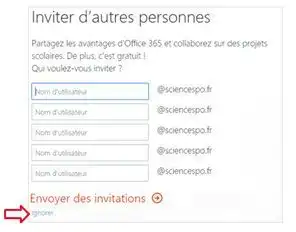
- You can let other Sciences Po users know about the free Office download. To skip this step, click on ‘Skip’ at the bottom of the “Invite others” box:

Then click “Install Now” to install Office 2016 in French and follow the steps.

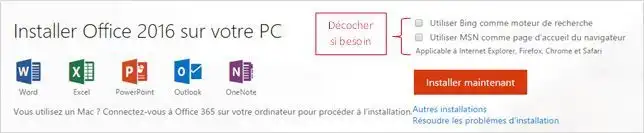
Puis cliquer sur "Installer maintenant" pour installer Office 2016 en français et suivre les étapes.
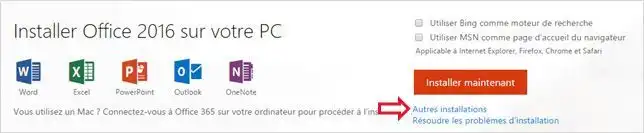
Pour installer une version Office 2013 ou Mac 2011 ou pour choisir une autre langue d’installation, cliquer sur "Autres Installations" et choisir les options souhaitées.
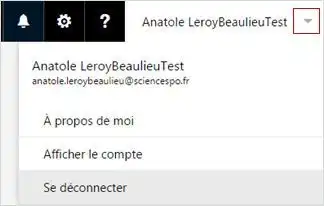
Access your Office account using the dropdown menu that appears when you click the triangle at the top right of the page next to your name. Click on “View Account” to find all your account information, including the number of Office downloads you’ve already made, under the “Installation Status” section
The password on the Microsoft download site syncs with your Sciences Po account password (if you change your Sciences Po password, you must use this new password on the Microsoft download site).

Can I download just one program from the Office Suite? No. You cannot choose just Excel or Word; all programs in the Office Suite will be installed at the same time.
How long is the license valid? The license is valid for one year from the date of download and is renewable annually if the email address prenom.nom@sciencespo.fr remains active.
Can I download versions other than the latest version of the Office Suite? Can I install it in languages other than French? Yes. Install an earlier version of Office or a version in another language by clicking “Other installations” (see the “How do I download the Office Suite?” section above).
I’ve used up my five installations—what should I do if I get a new personal computer on which I want to use Office in the future? Since the number of installations is limited to five,you will need to select one of the existing installations and deactivate it before you can proceed with the installation on the new computer. To do this, go to your Office 365 account settings under the “Installation Status” section.